From AWS to DIY: Building a Cost-Effective 💸 Home Server with Ubuntu Server, Docker, Portainer, Traefik & CrowdSec on a High-Performance Mini PC! 🚀
As a software engineer, I’ve relied on AWS for cloud computing for some time, but the rising costs finally pushed me to rethink things 💸. During Black Friday, I jumped on a deal I couldn’t resist 🎉 and built a home setup around a GMKtec mini PC with an AMD Ryzen 7 8845HS, paired with 2 x 48GB of DDR5 5600MHz Crucial RAM and two 4TB Samsung 990 PRO PCIe 4.0 NVMe M.2 SSDs. The whole setup cost me €1,100 (about $1,200 USD) and runs at only 35W ⚡—that’s roughly €4.30 ($4.60 USD) a month in electricity here in France 🇫🇷. Compare that to the $517 per month I’d pay to run an AWS EC2 m8g.4xlarge instance. Now, I’ve got 16 CPUs (8 cores, 16 threads) 💻, 96GB of speedy RAM ⚙️, and 8TB of PCIe 4.0 NVMe storage 💾 for demanding workloads. It’s a massive money-saver 💰 and the perfect base for a home lab running Ubuntu Server 🐧. Tools like Portainer make container management easy 🛠️, and Traefik with CrowdSec enhances reverse proxying & security 🔒. If cloud costs are draining your budget, making the switch is well worth it 🚀!
🤔 Ubuntu Server, Docker, Portainer, Traefik & CrowdSec?
What are Ubuntu Server, Docker, Portainer, Traefik, and CrowdSec? Quickly:
- 🐧 Ubuntu Server: Ubuntu Server is a robust and popular Linux-based operating system designed for server environments, providing the foundation for building reliable and secure web applications and services.
- 🐳 Docker: Docker is a platform that allows developers to automate the deployment of applications inside lightweight, portable containers, simplifying environment management and ensuring consistency across different systems.
- 🛠️ Portainer: Portainer is a simple and easy-to-use management interface for Docker, providing a graphical dashboard for managing containers, images, and volumes, which helps streamline container operations for developers.
- 🔄 Traefik: Traefik is a modern and powerful reverse proxy and load balancer designed for dynamic container environments. It integrates seamlessly with Docker, automatically discovering and routing requests to services while supporting Let's Encrypt SSL, middleware, and advanced traffic management.
- 🛡️ CrowdSec: CrowdSec is an open-source security tool that analyzes logs to detect and prevent malicious activity. It uses community-driven threat intelligence to block attackers in real-time, enhancing server security through behavioral detection and IP reputation filtering.
At the end of this guide, you should be able to set up a home server environment with Ubuntu Server, Docker, Portainer, Traefik, and CrowdSec—enabling efficient container management, secure reverse proxying, and proactive threat defense. Let's get started! 🚀
🔌 Create a Bootable USB Key
In this part, we are going to create a bootable USB key using Rufus.
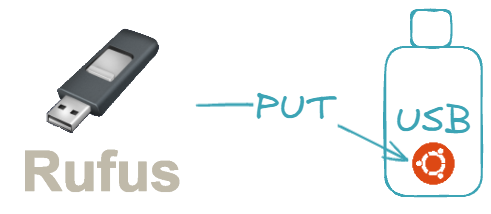
The goal is to set up a USB drive that will allow us to easily install Ubuntu Server on a system.
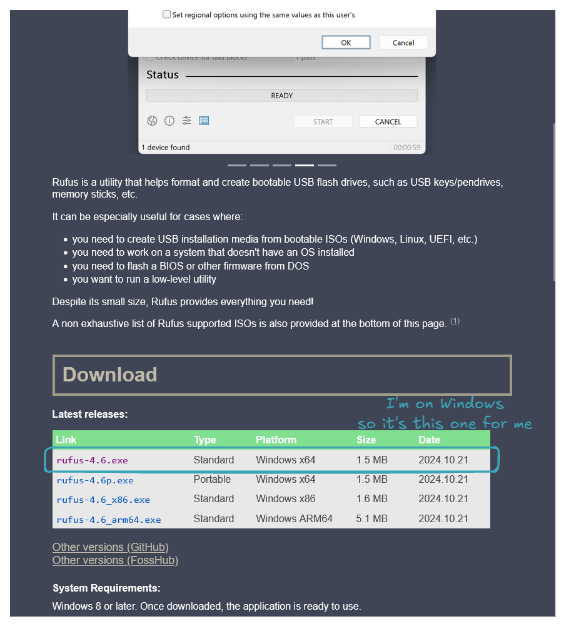
Go to rufus.ie to download and install Rufus.
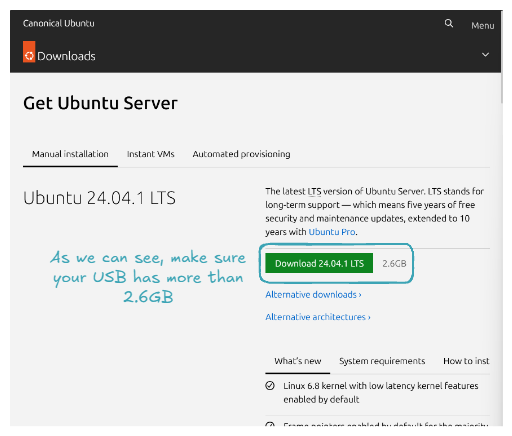
Do the same for Ubuntu Server at ubuntu.com/download/server.
Now it's time to create a bootable USB key with the Ubuntu Server ISO. Plug in your USB key, open Rufus, and for Boot selection, select the downloaded Ubuntu Server ISO. Here’s what your configuration should look like:
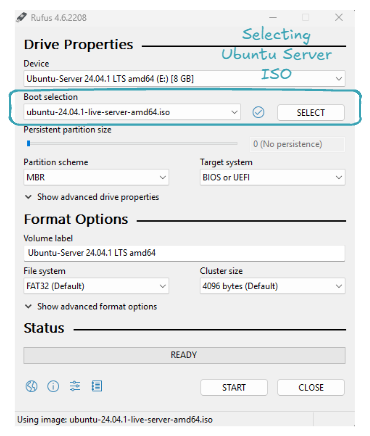
Click on START, and now all you have to do is wait 👍. Congratulations, you've set up a bootable USB key! Let's use it to install Ubuntu Server on our machine!
🐧 Install Ubuntu Server OS
The goal now is to use the USB key containing our Ubuntu Server ISO to install Ubuntu Server on our machine.
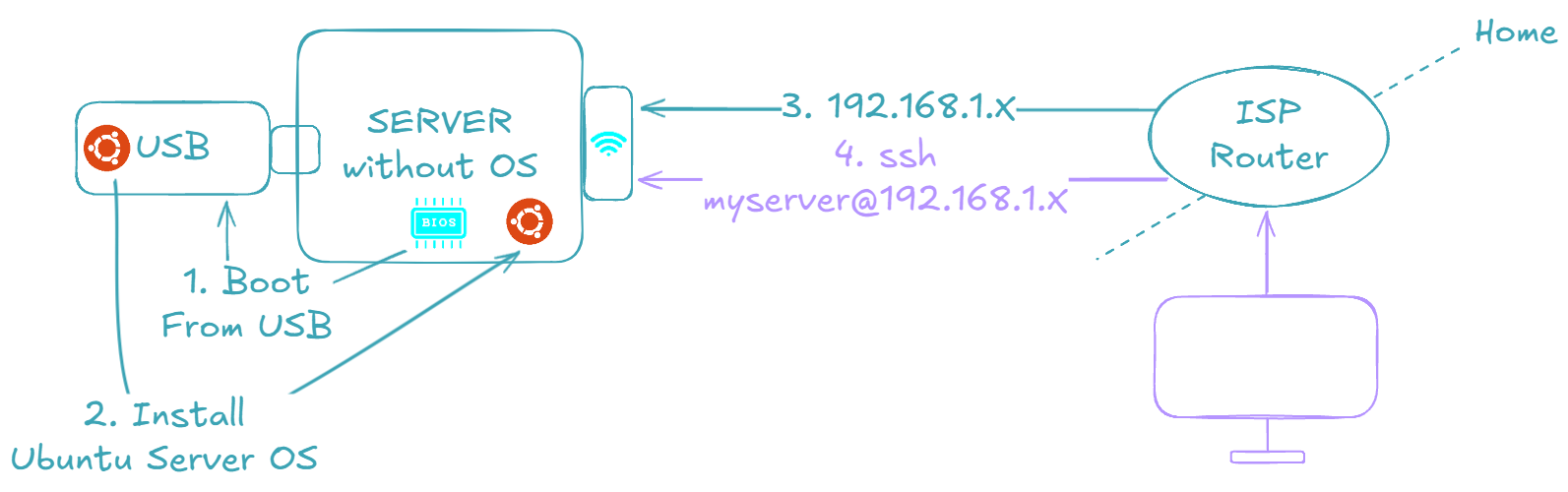
The ultimate goal is to have a machine that we can connect to via SSH, just like one rented from any cloud provider 😉.
Start by plugging the USB key, then turn ON the machine and open the BIOS. To open the BIOS, restart your PC and press the designated key (commonly F2, F12, Delete, or Esc), which depends on your PC's manufacturer.
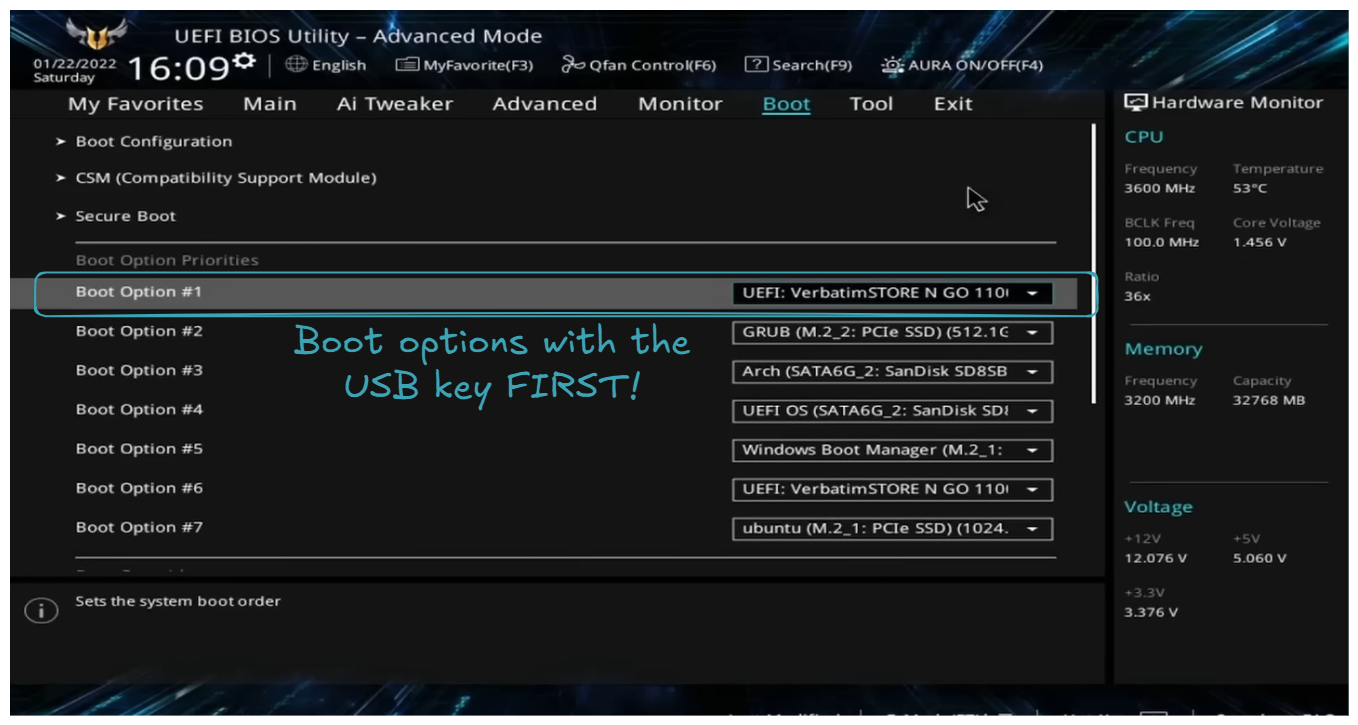
As explained on the screen, the USB key is set as the first boot option. Then restart the machine, you should be welcomed with the choice: Try or install Ubuntu Server.
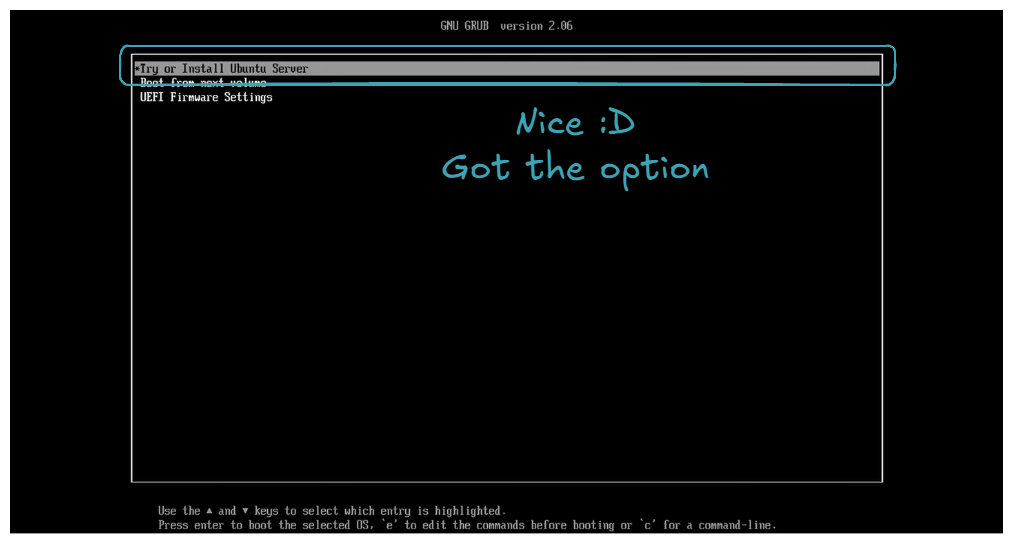
Select this choice, and then you will follow a series of instructions. Here are some tricky parts (obvious parts will not be detailed; regarding the few screens that will appear, I am not the original author. If you wish for a more detailed explanation, please check out SavvyNik's video 👍).
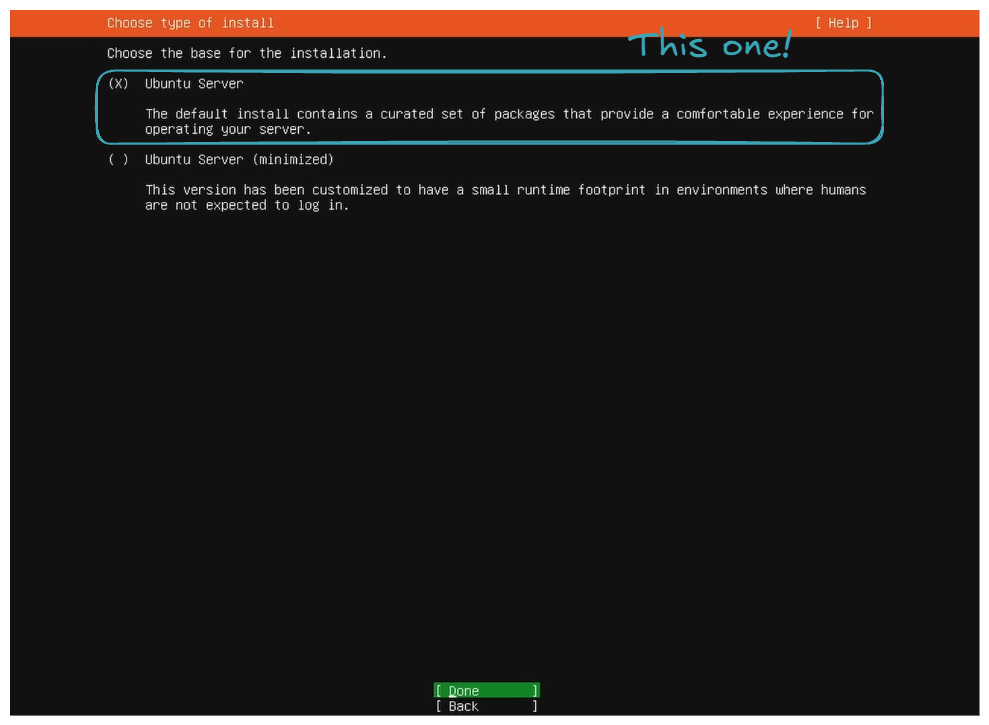
- Choose the basic installation.
- Set up the internet connection via Ethernet or WiFi.
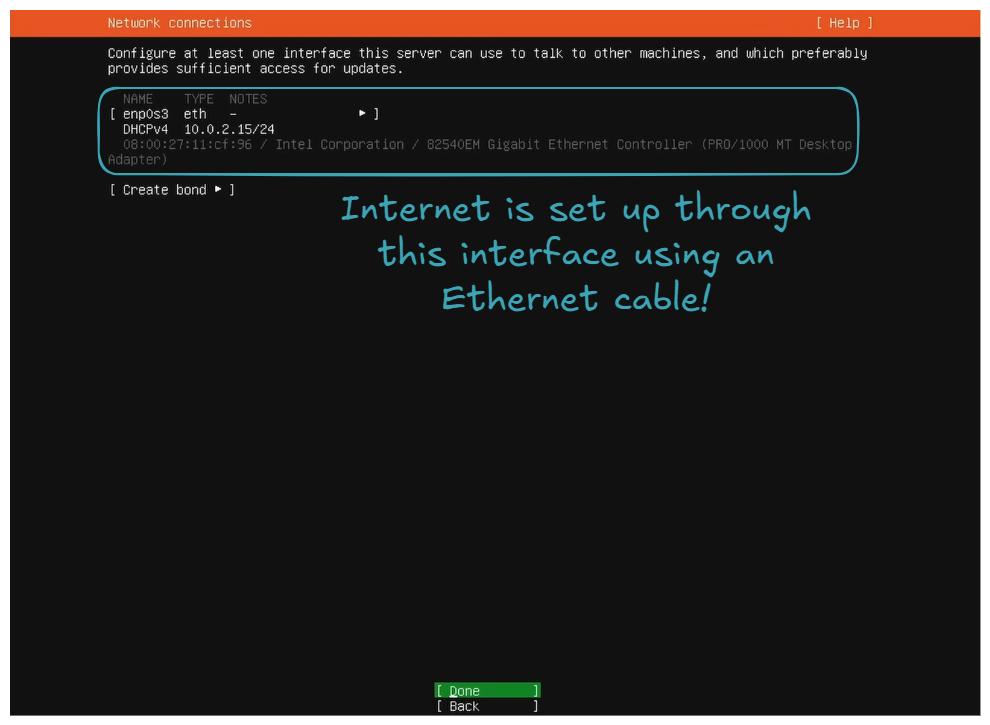
On your side, you may have more interfaces. It can also be via WiFi 👍! The important thing is to have one set up because internet will be needed for package downloads and updates, and, of course, for the SSH connection through the home network.
Use an entire diskandSet up this disk as LVM group.
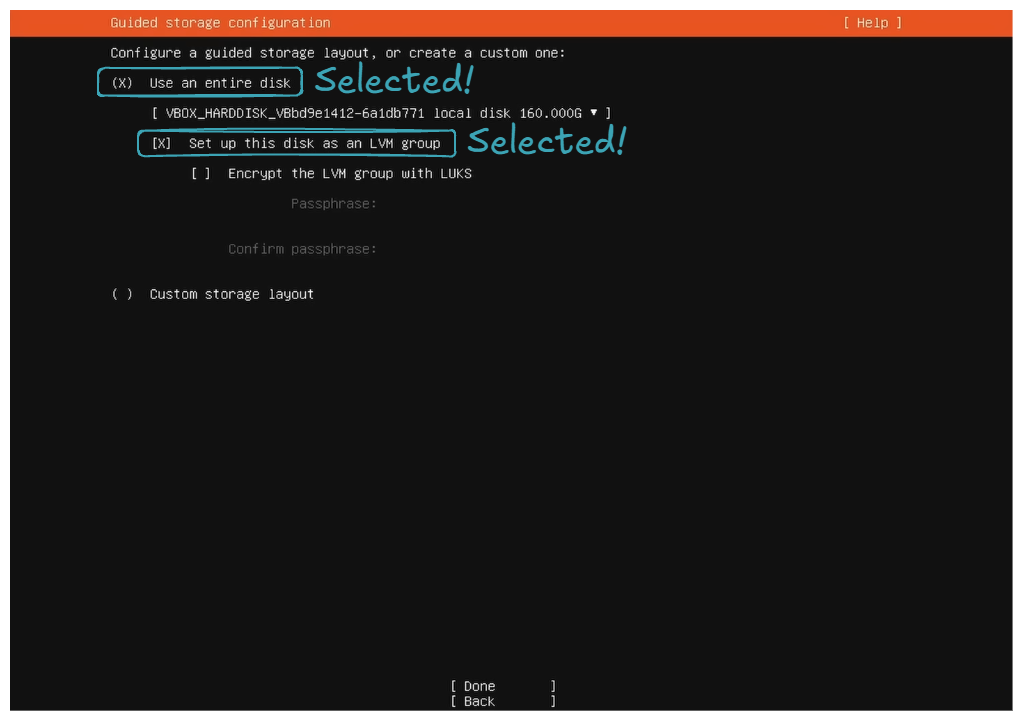
- Set the storage configuration to utilize all the disk space.
For the storage configuration part, by default, it does not utilize all the disk space. You can see this in the free space field in the DEVICE section:
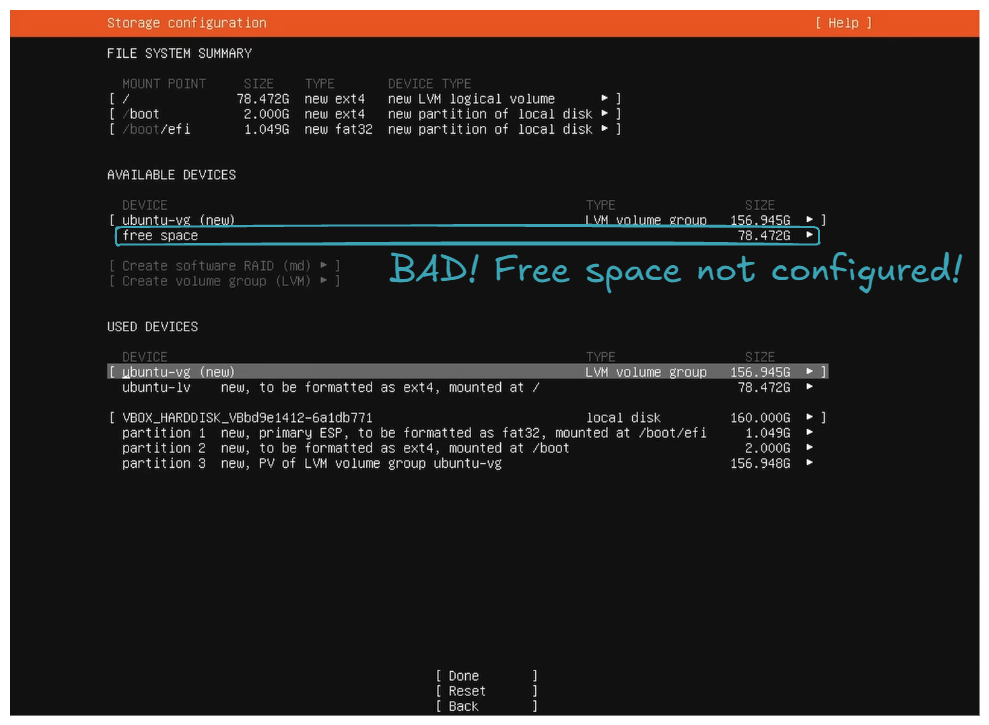
So the goal is to allocate all this unconfigured free space to ubuntu-lv. This will allow you to utilize all your disk space for your files, packages, etc.
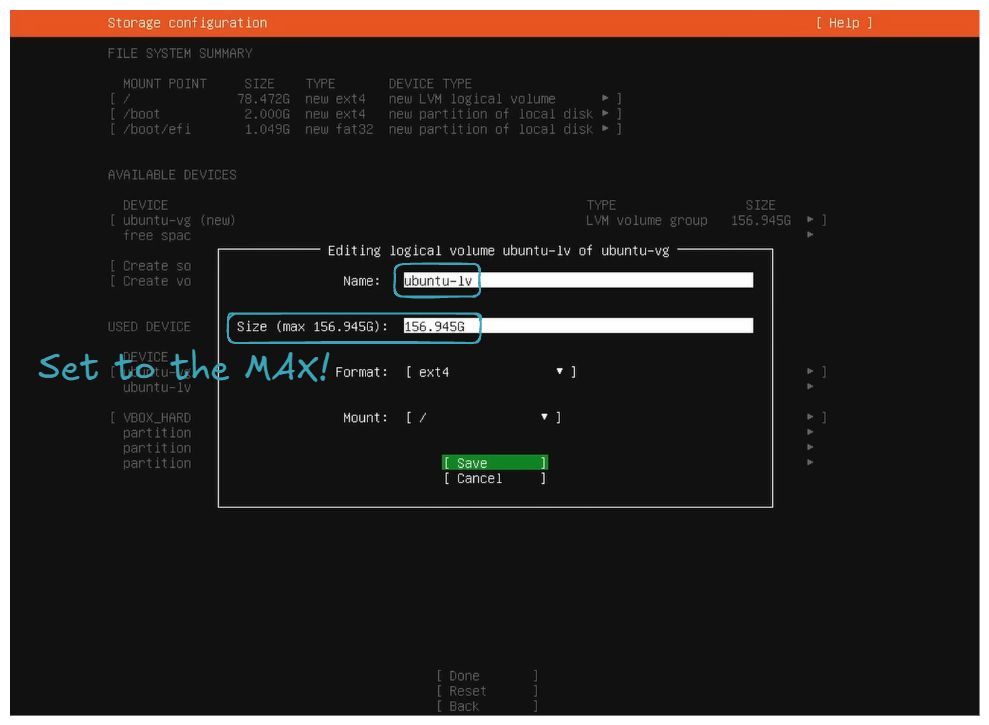
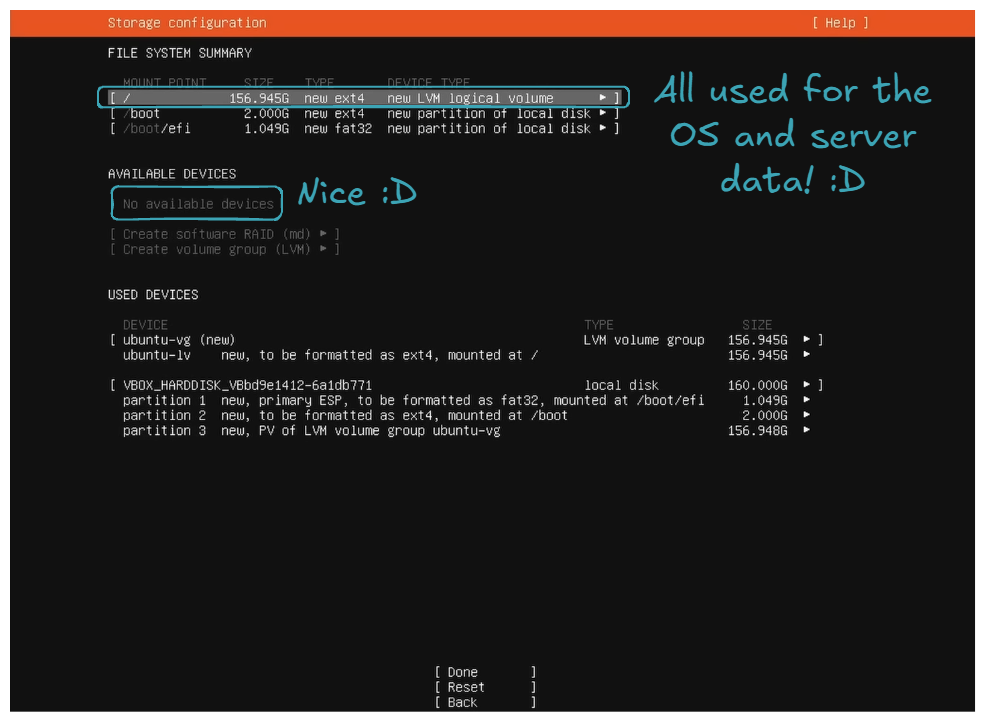
- Install OpenSSH server.
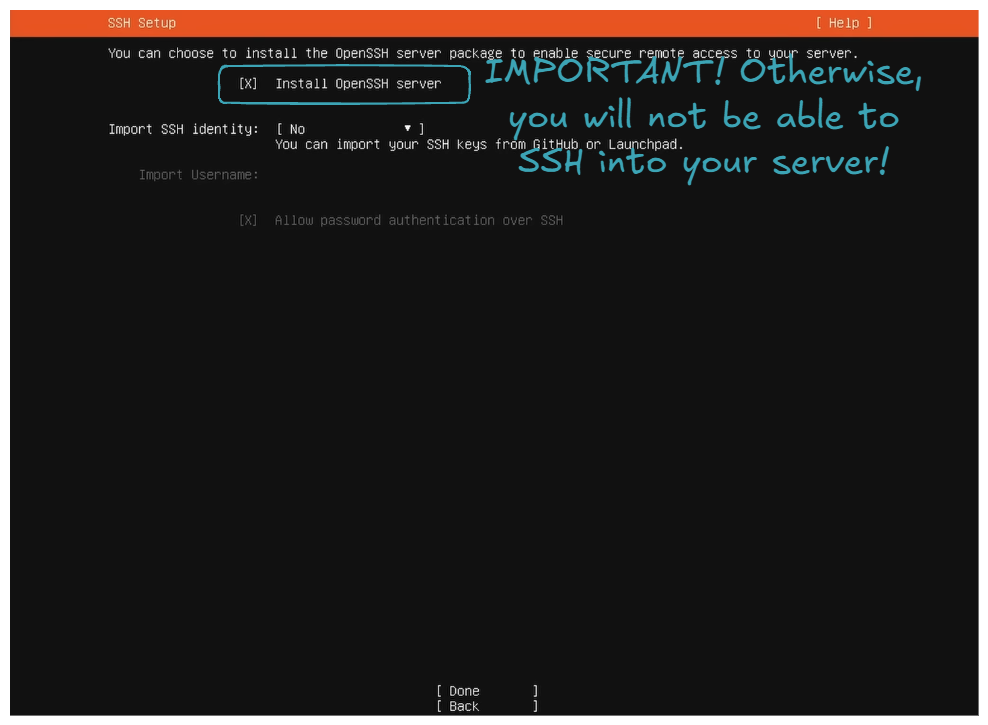
- Regarding
Featured Server Snaps, do not select anything and selectDone; it will start installing packages, be patient, and then just clickReboot Now.
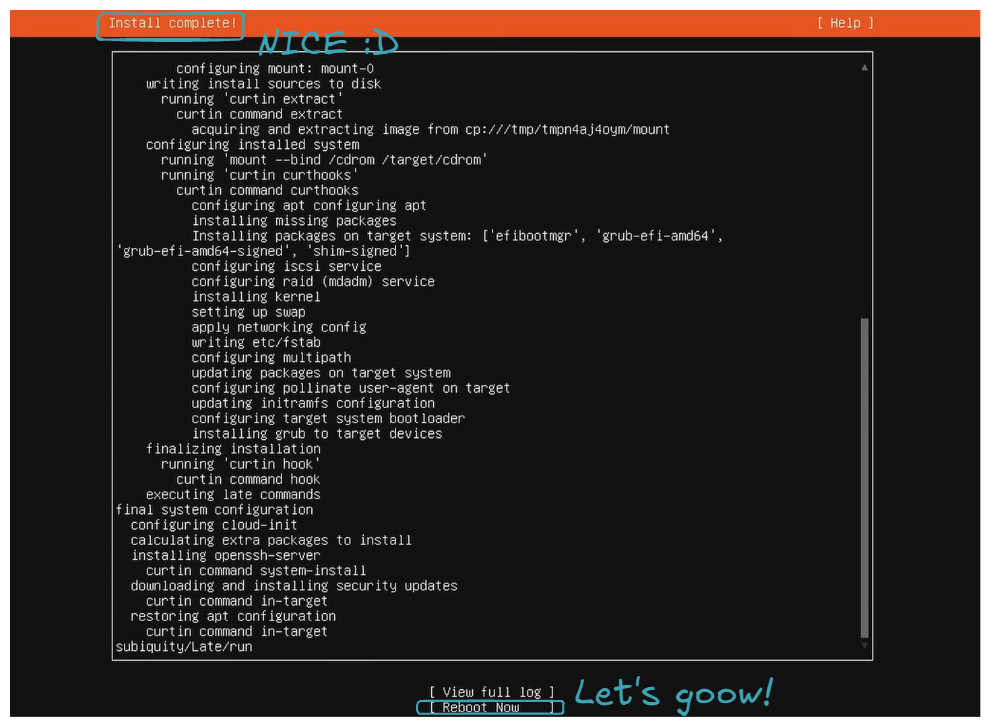
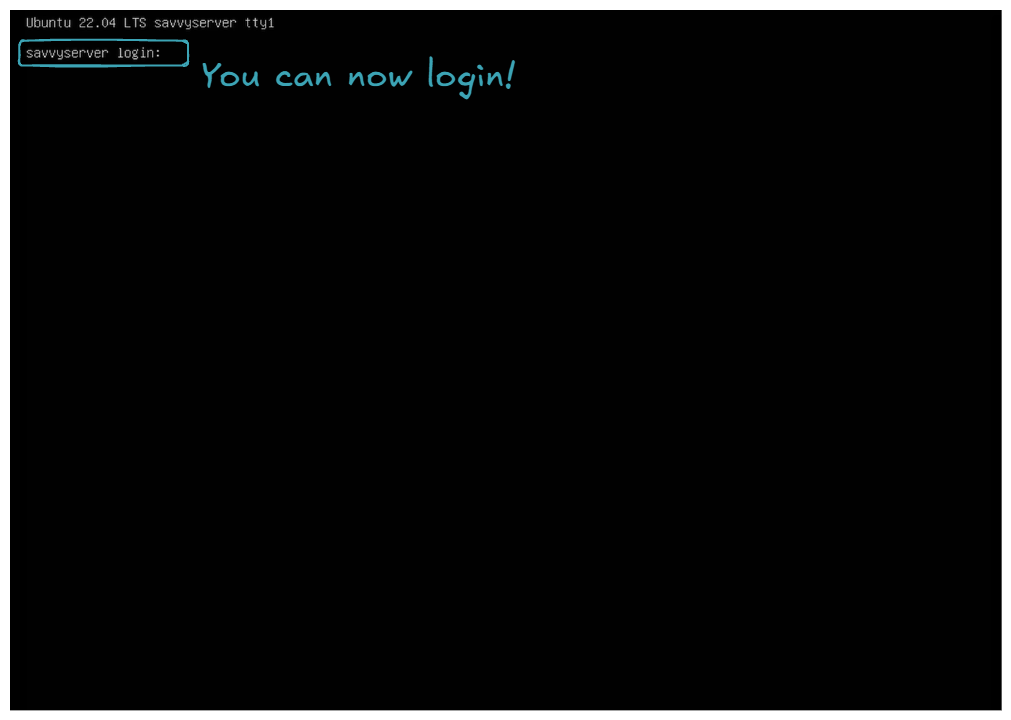
- You can now login!
Let it boot, and you should encounter an error because the USB key is still plugged in, and the server tries to boot from it. Turn off the server, remove the USB key, and then boot up the server. If you end up with the following screen, congratulations, you've successfully installed Ubuntu Server 😍!
Final thing, let's check if we can connect to the server from another machine via SSH. First, find the server's IP by logging in and running the following command on the server:
It should give you a list of interfaces. Find the one that has an inet address formatted as 192.168.1.X:
...
4: wlp4s0: <BROADCAST,MULTICAST,UP,LOWER_UP> mtu 1500 qdisc noqueue state UP group default qlen 1000
    link/ether xx:xx:xx:xx:xx:xx brd ff:ff:ff:ff:ff:ff
    inet 192.168.1.X/24 metric 600 brd 192.168.1.255 scope global dynamic wlp4s0
       valid_lft 38554sec preferred_lft 38554sec
    inet6 xxxx:xxxx:xxxx:xxxx:xxxx:xxxx:xxxx:xxxx/64 scope global dynamic mngtmpaddr noprefixroute
       valid_lft 86165sec preferred_lft 86165sec
    inet6 fe80::xxxx:xxxx:xxxx:xxxx/64 scope link
       valid_lft forever preferred_lft forever
...
Let's connect via SSH.
If it connects:
Then, congratulations! You've successfully set up a server similar to the ones you can rent from AWS or any other cloud provider 🤩. All the following commands will be executed from the work machine on behalf of the server via SSH from now on!
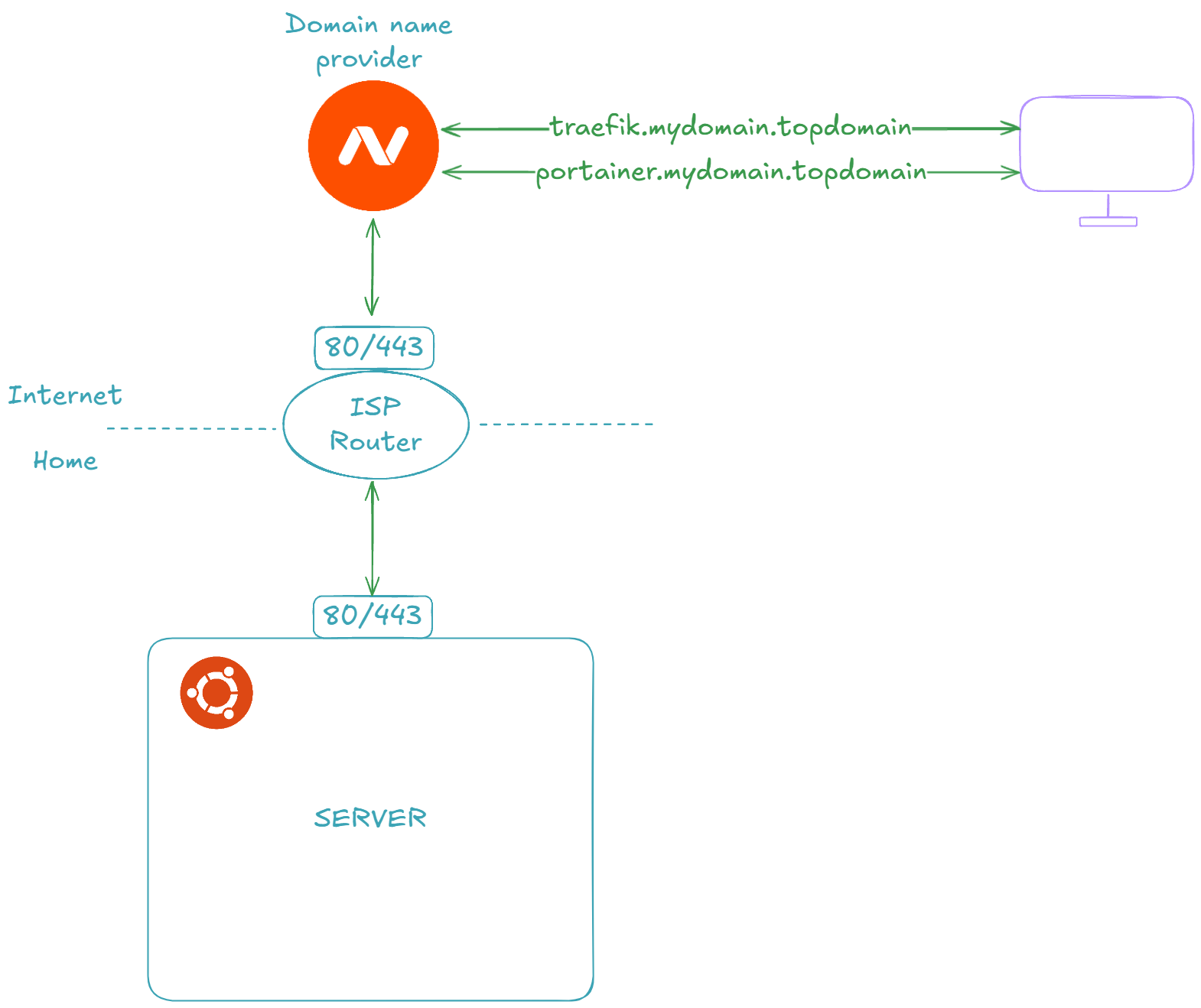
🌐 Prepare DNS and ISP Router settings to forward HTTP/HTTPS requests
In this section, we will prepare our DNS provider and ISP router to expose our services to the outside world. Depending on your ISP and domain name provider, it is highly likely that you will not have the exact same screens.
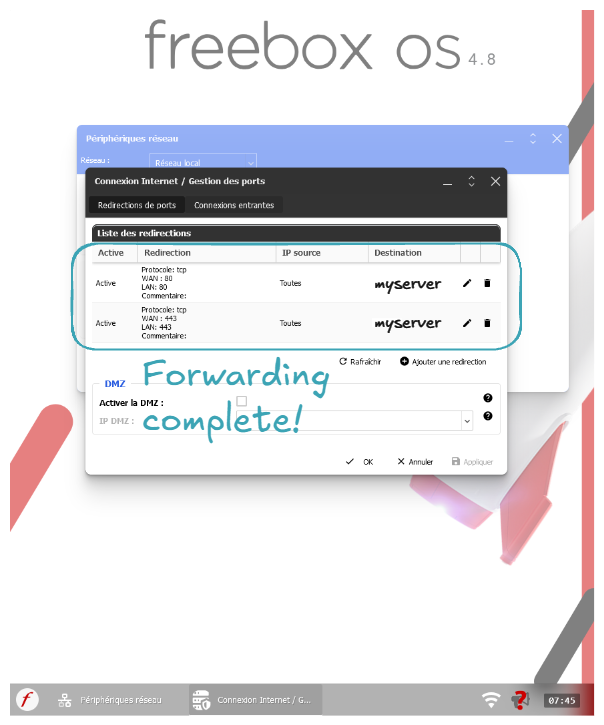
Let's start by forwarding ports 80 and 443 requests from our ISP router to our server's ports 80 and 443:
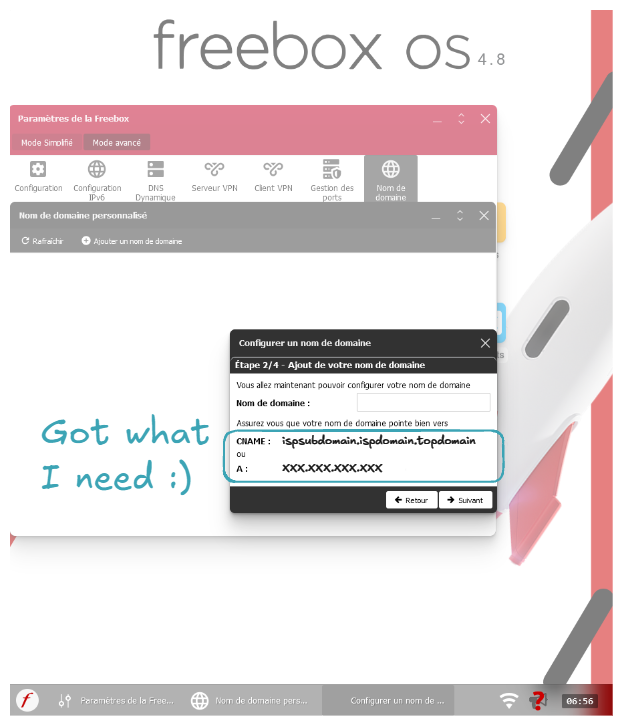
Let's now get the CNAME or router's Internet IP:
Note
You can also go to sites like whatismyip.com to get your IP.
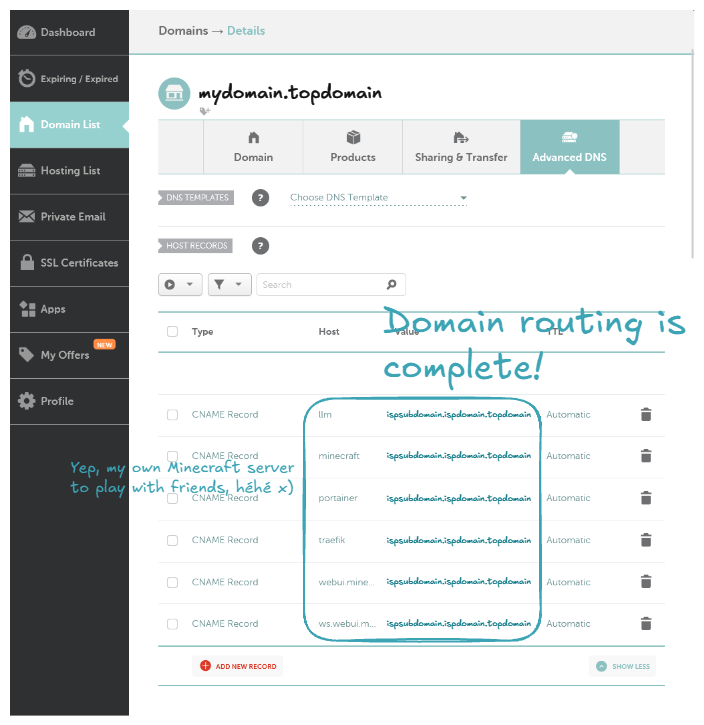
Now let's buy a domain name. In my case I choosed namecheap.com. After buying the domain name, let's configure it to be routed to our ISP router.
Note
You can also route to your ISP router using the IP address instead of the CNAME.
Note
Host means the subdomain name. For example, with a host of traefik, it will route the domain traefik.mydomain.topdomain to your ISP router.
Let's check if our DNS is correctly forwarding to our ISP router:
Server:         127.0.0.53
Address:        127.0.0.53#53

Non-authoritative answer:
traefik.mydomain.topdomain       canonical name = ispsubdomain.ispdomain.topdomain.
Name:   ispsubdomain.ispdomain.topdomain
Address: XXX.XXX.XXX.XXX
Name:   ispsubdomain.ispdomain.topdomain
Address: XXXX:XXXX:XXXX:XXXX:XXXX:XXXX:XXXX:XXXX
Congratulations, you've learned how to set up your DNS provider to forward requests to your ISP router! 🎉
🐋 Set Up Docker, Portainer, Traefik, and CrowdSec to Expose Your Services to the Internet Securely
Now, it's time to set up all the necessary tools to deploy, maintain, and expose our services/applications: Docker, Portainer, Traefik, and CrowdSec.
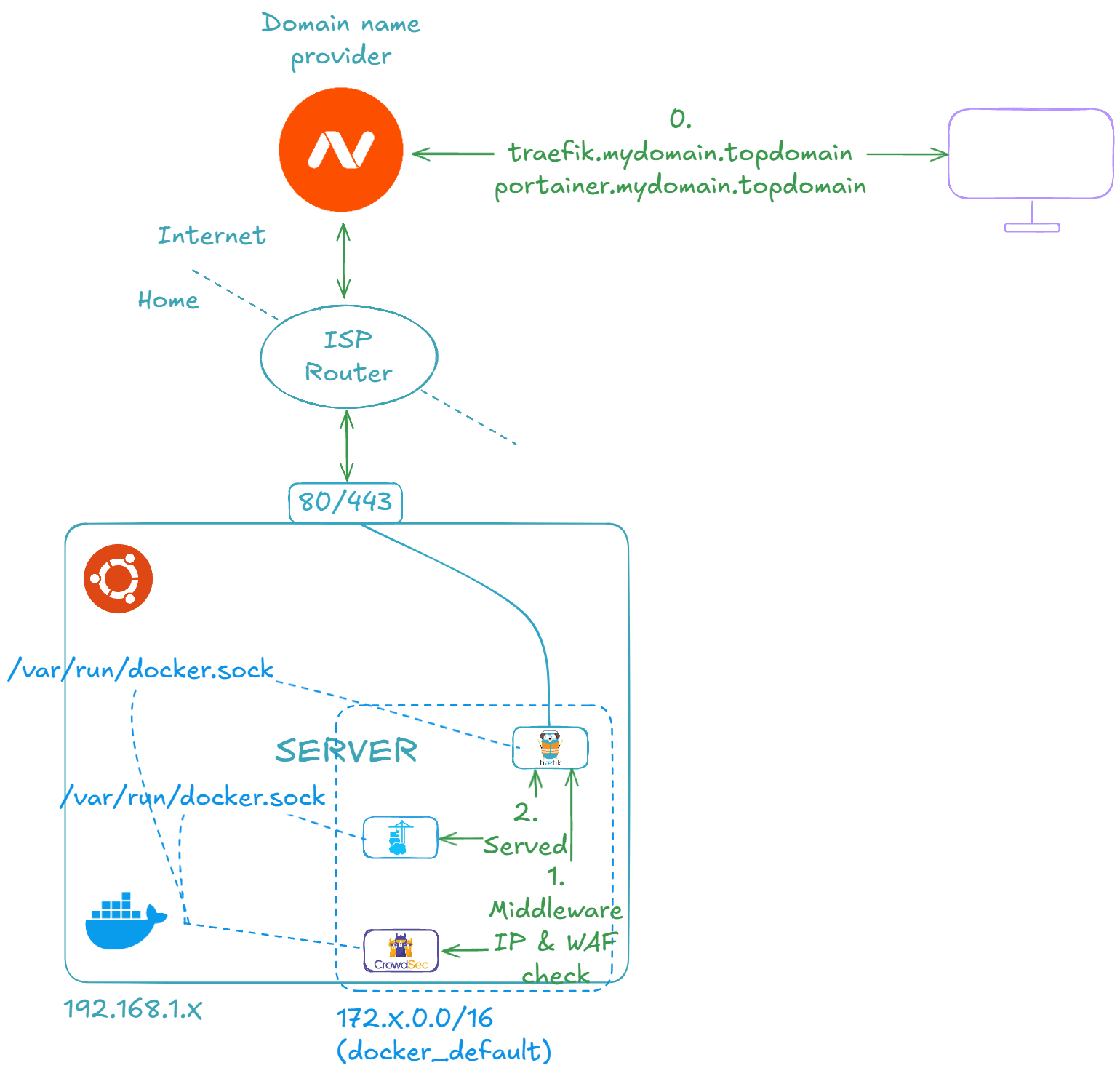
Let's first install Docker (official link, if necessary):
# Add Docker's official GPG key
sudo apt-get update
sudo apt-get install ca-certificates curl
sudo install -m 0755 -d /etc/apt/keyrings
sudo curl -fsSL https://download.docker.com/linux/ubuntu/gpg -o /etc/apt/keyrings/docker.asc
sudo chmod a+r /etc/apt/keyrings/docker.asc

# Add the repository to Apt sources
echo \
  "deb [arch=$(dpkg --print-architecture) signed-by=/etc/apt/keyrings/docker.asc] https://download.docker.com/linux/ubuntu \
  $(. /etc/os-release && echo "$VERSION_CODENAME") stable" | \
  sudo tee /etc/apt/sources.list.d/docker.list > /dev/null
sudo apt-get update
# Install Docker
sudo apt-get install docker-ce docker-ce-cli containerd.io docker-buildx-plugin docker-compose-plugin
You can verify the Docker installation using the following command:
Client: Docker Engine - Community
 Version:           27.4.1
 API version:       1.47
 Go version:        go1.22.10
 Git commit:        b9d17ea
 Built:             Tue Dec 17 15:45:46 2024
 OS/Arch:           linux/amd64
 Context:           default

Server: Docker Engine - Community
 Engine:
  Version:          27.4.1
  API version:      1.47 (minimum version 1.24)
  Go version:       go1.22.10
  Git commit:       c710b88
  Built:            Tue Dec 17 15:45:46 2024
  OS/Arch:          linux/amd64
  Experimental:     false
 containerd:
  Version:          1.7.24
  GitCommit:        88bf19b2105c8b17560993bee28a01ddc2f97182
 runc:
  Version:          1.2.2
  GitCommit:        v1.2.2-0-g7cb3632
 docker-init:
  Version:          0.19.0
  GitCommit:        de40ad0
Docker Compose version v2.32.1
Then install the Portainer, Traefik, and CrowdSec stack:
- The Docker Compose stack
services:
  traefik:
    build:
      dockerfile_inline: |
        # https://hub.docker.com/_/traefik/tags
        FROM traefik:v3.3
        RUN mkdir -p /etc/traefik/ && \
          echo "http:" > /etc/traefik/dynamic.yml && \
          echo "  middlewares:" >> /etc/traefik/dynamic.yml && \
          echo "    crowdsec-bouncer-traefik-plugin:" >> /etc/traefik/dynamic.yml && \
          echo "      plugin:" >> /etc/traefik/dynamic.yml && \
          echo "        crowdsec-bouncer-traefik-plugin:" >> /etc/traefik/dynamic.yml && \
          echo "          enabled: true" >> /etc/traefik/dynamic.yml && \
          echo "          crowdsecAppsecEnabled: true" >> /etc/traefik/dynamic.yml && \
          echo "          crowdsecLapiKey: ${CROWDSEC_BOUNCER_KEY_TRAEFIK}" >> /etc/traefik/dynamic.yml
        ENTRYPOINT ["/entrypoint.sh"]
    command: >-
      --providers.docker=true
      --providers.docker.exposedByDefault=false
      --providers.docker.network=docker_default
      --providers.file.filename=/etc/traefik/dynamic.yml
      --entryPoints.http.address=:80
      --entryPoints.https.address=:443
      --entryPoints.stream-minecraft.address=:25565/tcp
      --api=true
      --ping=true
      --certificatesresolvers.letsencrypt.acme.email=ilovedata.jjia@gmail.com
      --certificatesresolvers.letsencrypt.acme.storage=/letsencrypt/acme.json
      --certificatesresolvers.letsencrypt.acme.caserver=${TRAEFIK_TLS_CASERVER}
      --certificatesresolvers.letsencrypt.acme.tlschallenge=true
      --certificatesresolvers.letsencrypt.acme.httpchallenge=true
      --certificatesresolvers.letsencrypt.acme.httpchallenge.entrypoint=http
      --accesslog=true
      --accesslog.addinternals=true
      --accesslog.filepath=/var/log/traefik/access.log
      --experimental.plugins.crowdsec-bouncer-traefik-plugin.modulename=github.com/maxlerebourg/crowdsec-bouncer-traefik-plugin
      --experimental.plugins.crowdsec-bouncer-traefik-plugin.version=v1.4.1
    volumes:
      - /var/run/docker.sock:/var/run/docker.sock
      - traefik_letsencrypt:/letsencrypt/
      - traefik_var_log_traefik:/var/log/traefik/
    ports:
      - "80:80"
      - "443:443"
      - "25565:25565"
    networks:
      - default
    labels:
      - traefik.enable=true
      - traefik.http.routers.${COMPOSE_PROJECT_NAME}-traefik.tls=${TRAEFIK_TLS}
      - traefik.http.routers.${COMPOSE_PROJECT_NAME}-traefik.tls.certresolver=letsencrypt
      - traefik.http.routers.${COMPOSE_PROJECT_NAME}-traefik.entryPoints=http,https
      - traefik.http.routers.${COMPOSE_PROJECT_NAME}-traefik.rule=Host(`${TRAEFIK_HOST}`)
      - traefik.http.routers.${COMPOSE_PROJECT_NAME}-traefik.service=api@internal
      - traefik.http.routers.${COMPOSE_PROJECT_NAME}-traefik.middlewares=crowdsec-bouncer-traefik-plugin@file,${COMPOSE_PROJECT_NAME}-traefik-basicauth
      - traefik.http.middlewares.${COMPOSE_PROJECT_NAME}-traefik-basicauth.basicauth.users=${TRAEFIK_USER}:${TRAEFIK_PASSWORD_HASHED}
    healthcheck:
      test: traefik healthcheck --ping
      interval: 10s
      timeout: 5s
      retries: 5
    restart: unless-stopped

  traefik_accesslog_logrotate:
    build:
      dockerfile_inline: |
        # https://hub.docker.com/_/alpine/tags
        FROM alpine:3.21.3
        RUN apk add --no-cache logrotate docker-cli
        RUN mkdir -p /etc/logrotate.d && \
          echo "/var/log/traefik/access.log {" > /etc/logrotate.d/traefik && \
          echo "  size ${TRAEFIK_ACCESSLOG_LOGROTATE_SIZE}" >> /etc/logrotate.d/traefik && \
          echo "  rotate ${TRAEFIK_ACCESSLOG_LOGROTATE_ROTATE}" >> /etc/logrotate.d/traefik && \
          echo "  maxage ${TRAEFIK_ACCESSLOG_LOGROTATE_MAXAGE}" >> /etc/logrotate.d/traefik && \
          echo "  compress" >> /etc/logrotate.d/traefik && \
          echo "  missingok" >> /etc/logrotate.d/traefik && \
          echo "  notifempty" >> /etc/logrotate.d/traefik && \
          echo "  postrotate" >> /etc/logrotate.d/traefik && \
          echo "    docker kill --signal=\"USR1\" \$(docker ps --filter \"name=^${COMPOSE_PROJECT_NAME}-traefik-1$\" --format \"{{.ID}}\")" >> /etc/logrotate.d/traefik && \
          echo "  endscript" >> /etc/logrotate.d/traefik && \
          echo "}" >> /etc/logrotate.d/traefik && \
          echo "${TRAEFIK_ACCESSLOG_LOGROTATE_CRON_EXPRESSION} logrotate -v /etc/logrotate.d/traefik" | crontab -
        ENTRYPOINT ["crond", "-f"]
    volumes:
      - /var/run/docker.sock:/var/run/docker.sock
      - traefik_var_log_traefik:/var/log/traefik/
    depends_on:
      traefik:
        condition: service_healthy
    healthcheck:
      test: pgrep crond
      interval: 10s
      timeout: 5s
      retries: 5
    restart: unless-stopped

  crowdsec:
    build:
      dockerfile_inline: |
        # https://hub.docker.com/r/crowdsecurity/crowdsec/tags
        FROM crowdsecurity/crowdsec:v1.6.5 AS crowdsec_builder
        ENV DISABLE_ONLINE_API="true"
        ENV NO_HUB_UPGRADE="true"
        RUN ./docker_start.sh > /dev/null 2>&1 & \
          for i in {1..5}; do cscli hub update || sleep 10; done && \
          cscli hub upgrade && \
          cscli collections install \
            crowdsecurity/traefik \
            crowdsecurity/http-cve \
            crowdsecurity/base-http-scenarios \
            crowdsecurity/http-dos \
            crowdsecurity/sshd \
            crowdsecurity/linux \
            crowdsecurity/appsec-crs \
            crowdsecurity/appsec-generic-rules \
            crowdsecurity/appsec-virtual-patching \
          && \
          kill $(pgrep -f "crowdsec -c /etc/crowdsec/config.yaml") && \
          rm /etc/crowdsec/local_api_credentials.yaml
        WORKDIR /etc/crowdsec/acquis.d/
        RUN echo "filenames:" > ./traefik.yml && \
          echo "  - /var/log_traefik/access.log" >> ./traefik.yml && \
          echo "labels:" >> ./traefik.yml && \
          echo "  type: traefik" >> ./traefik.yml  && \
          echo "appsec_config: crowdsecurity/appsec-default" > ./appsec.yml && \
          echo "labels:" >> ./appsec.yml && \
          echo "  type: appsec" >> ./appsec.yml && \
          echo "listen_addr: 0.0.0.0:7422" >> ./appsec.yml && \
          echo "source: appsec" >> ./appsec.yml

        # https://hub.docker.com/r/crowdsecurity/crowdsec/tags
        FROM crowdsecurity/crowdsec:v1.6.5
        RUN mkdir -p /etc/crowdsec/acquis.d/
        COPY --from=crowdsec_builder /etc/crowdsec/ /etc/crowdsec/
        COPY --from=crowdsec_builder /etc/crowdsec/acquis.d/ /etc/crowdsec/acquis.d/
        ENTRYPOINT ["/bin/bash", "-c", "/docker_start.sh & for i in {1..5}; do cscli bouncers list > /dev/null 2>&1 && break || sleep 10; done && cscli bouncers remove TRAEFIK > /dev/null 2>&1 || true && cscli bouncers add TRAEFIK --key ${CROWDSEC_BOUNCER_KEY_TRAEFIK} > /dev/null 2>&1 && tail -f /dev/null"]
    environment:
      DISABLE_ONLINE_API: "true"
      NO_HUB_UPGRADE: "true"
    volumes:
      - crowdsec_var_lib_crowdsec_data:/var/lib/crowdsec/data/
      - traefik_var_log_traefik:/var/log_traefik/:ro
    networks:
      - default
    healthcheck:
      test: "cscli metrics"
      interval: 10s
      timeout: 5s
      retries: 5
    depends_on:
      traefik:
        condition: service_healthy
    restart: unless-stopped

  portainer:
    # https://hub.docker.com/r/portainer/portainer/tags
    image: portainer/portainer-ce:2.26.1
    volumes:
      - /var/run/docker.sock:/var/run/docker.sock
      - portainer_data:/data/
    networks:
      - default
    labels:
      - traefik.enable=true
      - traefik.http.routers.${COMPOSE_PROJECT_NAME}-portainer.tls=${TRAEFIK_TLS}
      - traefik.http.routers.${COMPOSE_PROJECT_NAME}-portainer.tls.certresolver=letsencrypt
      - traefik.http.routers.${COMPOSE_PROJECT_NAME}-portainer.entryPoints=http,https
      - traefik.http.routers.${COMPOSE_PROJECT_NAME}-portainer.rule=Host(`${PORTAINER_HOST}`)
      - traefik.http.routers.${COMPOSE_PROJECT_NAME}-portainer.service=${COMPOSE_PROJECT_NAME}-portainer
      - traefik.http.services.${COMPOSE_PROJECT_NAME}-portainer.loadbalancer.server.port=9000
      - traefik.http.routers.${COMPOSE_PROJECT_NAME}-portainer.middlewares=crowdsec-bouncer-traefik-plugin@file
    restart: unless-stopped

volumes:
  traefik_letsencrypt:
  traefik_var_log_traefik:
  crowdsec_var_lib_crowdsec_data:
  portainer_data:

networks:
  default:
- The command-line interface (CLI) command to run
sudo COMPOSE_PROJECT_NAME='docker' TRAEFIK_TLS=true TRAEFIK_TLS_CASERVER='https://acme-v02.api.letsencrypt.org/directory' TRAEFIK_HOST='traefik.mydomain.topdomain' TRAEFIK_USER='myuser' TRAEFIK_PASSWORD_HASHED='myhashedpassword' TRAEFIK_ACCESSLOG_LOGROTATE_SIZE='200M' TRAEFIK_ACCESSLOG_LOGROTATE_ROTATE='14' TRAEFIK_ACCESSLOG_LOGROTATE_MAXAGE='30' TRAEFIK_ACCESSLOG_LOGROTATE_CRON_EXPRESSION='0 0,12 * * *' CROWDSEC_BOUNCER_KEY_TRAEFIK=$(tr -dc 'a-zA-Z0-9' < /dev/urandom | head -c50) PORTAINER_HOST='portainer.mydomain.topdomain' docker compose -p docker -f docker-compose.yml up -d --remove-orphans --build && sudo docker image prune -f
Once completed, you can navigate to https://portainer.mydomain.topdomain. You should be prompted to create the administrator account. Once completed and logged in, the following screen should be presented to you:
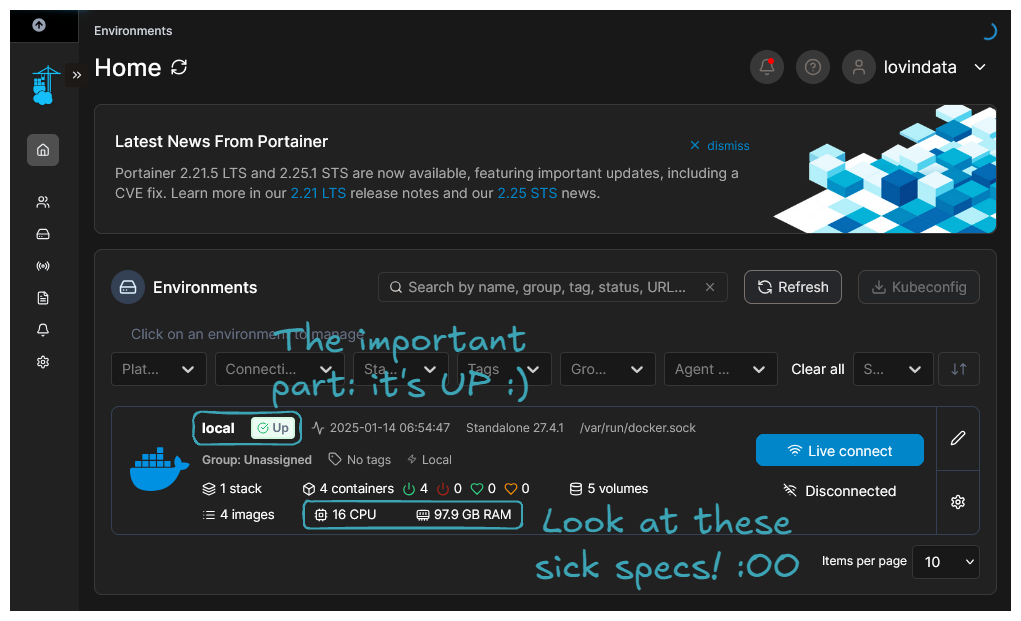
Congratulations, you've successfully installed Portainer! You can now deploy, maintain, and monitor containerized applications through a Web UI.
You can also navigate to http://traefik.mydomain.topdomain. The login and password are the ones set by Traefik environment variables. Passwords must be hashed using MD5, SHA1, or BCrypt; to achieve that, you can use the Bcrypt Hash Generator online or, for a safer option, the htpasswd command from the apache2-utils package. Once logged in, you should see the following screen:

Congratulation! you've successfully installed Traefik! 🤗
Warning
Beware, exposing Traefik and Portainer allows people to attempt to crack your login/password. If they succeed, they will have control over the deployed applications. So, if working from home is the only thing you do, it might be wise not to expose these two services and to access them only from your home network. To achieve this, you should expose extra ports for Traefik and Portainer and remove the corresponding Traefik labels that route to the services. The extra ports will allow you to access Traefik and Portainer via 192.168.1.X.
Lastly, about CrowdSec—it's an internal service that acts as middleware between Traefik and the services. To access it, you will need to use basic Docker CLI and Bash CLI:
sudo docker exec -it $(sudo docker ps --filter name="docker-crowdsec-1" --format "{{.ID}}") /bin/bash
Then you will be prompted to the CrowdSec container:
myuser@myserver:~$ sudo docker exec -it $(sudo docker ps --filter name="docker-crowdsec-1" --format "{{.ID}}") /bin/bash
bcae0c3dccd6:/#
From there, you will be able to run several cscli commands:
- The currently active decisions, including active IP bans
bcae0c3dccd6:/# cscli decisions list
╭─────┬──────────┬─────────────────┬────────────────────────────┬────────┬─────────┬───────────────────────────┬────────┬────────────┬──────────╮
│  ID │  Source  │   Scope:Value   │           Reason           │ Action │ Country │             AS            │ Events │ expiration │ Alert ID │
├─────┼──────────┼─────────────────┼────────────────────────────┼────────┼─────────┼───────────────────────────┼────────┼────────────┼──────────┤
│ 336 │ crowdsec │ Ip:45.148.10.34 │ crowdsecurity/http-probing │ ban    │ NL      │ 48090 Techoff Srv Limited │ 11     │ 3h35m36s   │ 342      │
╰─────┴──────────┴─────────────────┴────────────────────────────┴────────┴─────────┴───────────────────────────┴────────┴────────────┴──────────╯
1 duplicated entries skipped
- The alerts, including IP bans
60dcca3bcedc:/# cscli alerts list
╭─────┬────────────────────┬───────────────────────────────────────┬─────────┬─────────────────────────────────────────────┬───────────┬─────────────────────────────────────────╮
│  ID │        value       │                 reason                │ country │                      as                     │ decisions │                created_at               │
├─────┼────────────────────┼───────────────────────────────────────┼─────────┼─────────────────────────────────────────────┼───────────┼─────────────────────────────────────────┤
│ 342 │ Ip:45.148.10.34    │ crowdsecurity/http-probing            │ NL      │ 48090 Techoff Srv Limited                   │ ban:1     │ 2025-03-07 06:51:25.711705966 +0000 UTC │
│ 341 │ Ip:45.148.10.34    │ crowdsecurity/http-sensitive-files    │ NL      │ 48090 Techoff Srv Limited                   │ ban:1     │ 2025-03-07 06:51:26.235906638 +0000 UTC │
│ 340 │ Ip:45.148.10.35    │ crowdsecurity/http-sensitive-files    │ NL      │ 48090 Techoff Srv Limited                   │ ban:1     │ 2025-03-07 02:49:34.925254325 +0000 UTC │
│ 339 │ Ip:45.148.10.35    │ crowdsecurity/http-sensitive-files    │ NL      │ 48090 Techoff Srv Limited                   │ ban:1     │ 2025-03-07 01:43:30.620059821 +0000 UTC │
│ 338 │ Ip:34.204.174.174  │ crowdsecurity/vpatch-git-config       │ US      │ 14618 AMAZON-AES                            │           │ 2025-03-07 01:18:21 +0000 UTC           │
│ 337 │ Ip:195.178.110.163 │ crowdsecurity/http-probing            │ BG      │ 48090 Techoff Srv Limited                   │ ban:1     │ 2025-03-07 01:17:18.527430962 +0000 UTC │
│ 336 │ Ip:195.178.110.163 │ crowdsecurity/http-sensitive-files    │ BG      │ 48090 Techoff Srv Limited                   │ ban:1     │ 2025-03-07 01:17:23.925647127 +0000 UTC │
│ 335 │ Ip:172.212.103.85  │ crowdsecurity/CVE-2022-41082          │ US      │ 8075 MICROSOFT-CORP-MSN-AS-BLOCK            │ ban:1     │ 2025-03-07 00:38:04.857829837 +0000 UTC │
│ 334 │ Ip:195.178.110.163 │ crowdsecurity/http-sensitive-files    │ BG      │ 48090 Techoff Srv Limited                   │ ban:1     │ 2025-03-07 00:11:13.169639366 +0000 UTC │
│ 333 │ Ip:47.83.150.190   │ crowdsecurity/thinkphp-cve-2018-20062 │ HK      │ 45102 Alibaba US Technology Co., Ltd.       │ ban:1     │ 2025-03-06 23:38:58.80656314 +0000 UTC  │
│ 332 │ Ip:47.83.150.190   │ crowdsecurity/CVE-2017-9841           │ HK      │ 45102 Alibaba US Technology Co., Ltd.       │ ban:1     │ 2025-03-06 23:38:57.743199532 +0000 UTC │
│ 331 │ Ip:47.83.150.190   │ crowdsecurity/http-probing            │ HK      │ 45102 Alibaba US Technology Co., Ltd.       │ ban:1     │ 2025-03-06 23:37:50.77369468 +0000 UTC  │
│ 330 │ Ip:47.83.150.190   │ crowdsecurity/CVE-2017-9841           │ HK      │ 45102 Alibaba US Technology Co., Ltd.       │ ban:1     │ 2025-03-06 23:37:54.704898287 +0000 UTC │
│ 329 │ Ip:47.83.150.190   │ crowdsecurity/http-cve-2021-41773     │ HK      │ 45102 Alibaba US Technology Co., Ltd.       │ ban:1     │ 2025-03-06 23:37:50.773618378 +0000 UTC │
│ 328 │ Ip:34.204.174.174  │ crowdsecurity/vpatch-git-config       │ US      │ 14618 AMAZON-AES                            │           │ 2025-03-06 22:01:32 +0000 UTC           │
│ 327 │ Ip:45.148.10.34    │ crowdsecurity/http-probing            │ NL      │ 48090 Techoff Srv Limited                   │ ban:1     │ 2025-03-06 20:01:08.946235719 +0000 UTC │
│ 326 │ Ip:45.148.10.34    │ crowdsecurity/http-sensitive-files    │ NL      │ 48090 Techoff Srv Limited                   │ ban:1     │ 2025-03-06 20:01:09.464984839 +0000 UTC │
│ 325 │ Ip:34.204.174.174  │ crowdsecurity/vpatch-git-config       │ US      │ 14618 AMAZON-AES                            │           │ 2025-03-06 17:41:43 +0000 UTC           │
│ 324 │ Ip:195.178.110.163 │ crowdsecurity/http-sensitive-files    │ BG      │ 48090 Techoff Srv Limited                   │ ban:1     │ 2025-03-06 16:59:39.111415964 +0000 UTC │
│ 323 │ Ip:34.204.174.174  │ crowdsecurity/vpatch-git-config       │ US      │ 14618 AMAZON-AES                            │           │ 2025-03-06 16:58:00 +0000 UTC           │
│ 322 │ Ip:45.148.10.35    │ crowdsecurity/http-sensitive-files    │ NL      │ 48090 Techoff Srv Limited                   │ ban:1     │ 2025-03-06 16:51:18.086862468 +0000 UTC │
│ 321 │ Ip:34.204.174.174  │ crowdsecurity/vpatch-git-config       │ US      │ 14618 AMAZON-AES                            │           │ 2025-03-06 16:26:44 +0000 UTC           │
│ 320 │ Ip:45.148.10.34    │ crowdsecurity/http-probing            │ NL      │ 48090 Techoff Srv Limited                   │ ban:1     │ 2025-03-06 14:11:13.035448355 +0000 UTC │
│ 319 │ Ip:45.148.10.34    │ crowdsecurity/http-sensitive-files    │ NL      │ 48090 Techoff Srv Limited                   │ ban:1     │ 2025-03-06 14:11:13.56899664 +0000 UTC  │
│ 318 │ Ip:8.222.172.249   │ crowdsecurity/thinkphp-cve-2018-20062 │ SG      │ 45102 Alibaba US Technology Co., Ltd.       │ ban:1     │ 2025-03-06 13:45:57.230230638 +0000 UTC │
│ 317 │ Ip:8.222.172.249   │ crowdsecurity/http-probing            │ SG      │ 45102 Alibaba US Technology Co., Ltd.       │ ban:1     │ 2025-03-06 13:45:34.989475157 +0000 UTC │
│ 316 │ Ip:8.222.172.249   │ crowdsecurity/CVE-2017-9841           │ SG      │ 45102 Alibaba US Technology Co., Ltd.       │ ban:1     │ 2025-03-06 13:45:37.820707681 +0000 UTC │
│ 315 │ Ip:8.222.172.249   │ crowdsecurity/http-cve-2021-41773     │ SG      │ 45102 Alibaba US Technology Co., Ltd.       │ ban:1     │ 2025-03-06 13:45:34.989421638 +0000 UTC │
│ 314 │ Ip:78.153.140.224  │ crowdsecurity/http-probing            │ GB      │ 202306 Hostglobal.plus Ltd                  │ ban:1     │ 2025-03-06 13:26:10.789683174 +0000 UTC │
│ 313 │ Ip:78.153.140.224  │ crowdsecurity/http-sensitive-files    │ GB      │ 202306 Hostglobal.plus Ltd                  │ ban:1     │ 2025-03-06 13:26:10.789440914 +0000 UTC │
│ 312 │ Ip:78.153.140.179  │ crowdsecurity/http-probing            │ GB      │ 202306 Hostglobal.plus Ltd                  │ ban:1     │ 2025-03-06 11:06:07.846945115 +0000 UTC │
│ 311 │ Ip:78.153.140.179  │ crowdsecurity/http-sensitive-files    │ GB      │ 202306 Hostglobal.plus Ltd                  │ ban:1     │ 2025-03-06 11:06:07.846818179 +0000 UTC │
│ 310 │ Ip:192.168.1.254   │ crowdsecurity/vpatch-env-access       │         │                                             │           │ 2025-03-06 06:46:48 +0000 UTC           │
│ 309 │ Ip:45.148.10.35    │ crowdsecurity/http-sensitive-files    │ NL      │ 48090 Techoff Srv Limited                   │ ban:1     │ 2025-03-06 04:54:44.045808147 +0000 UTC │
│ 308 │ Ip:45.148.10.90    │ crowdsecurity/http-sensitive-files    │ NL      │ 48090 Techoff Srv Limited                   │ ban:1     │ 2025-03-06 04:39:40.9902859 +0000 UTC   │
│ 307 │ Ip:31.210.213.230  │ crowdsecurity/CVE-2017-9841           │ RU      │ 43727 Jsc Kvant-telekom                     │ ban:1     │ 2025-03-06 03:45:33.005141454 +0000 UTC │
│ 306 │ Ip:31.210.213.230  │ crowdsecurity/http-cve-2021-41773     │ RU      │ 43727 Jsc Kvant-telekom                     │ ban:1     │ 2025-03-06 03:45:16.048775589 +0000 UTC │
│ 305 │ Ip:8.134.196.56    │ crowdsecurity/thinkphp-cve-2018-20062 │ CN      │ 37963 Hangzhou Alibaba Advertising Co.,Ltd. │ ban:1     │ 2025-03-05 15:33:13.404183934 +0000 UTC │
│ 304 │ Ip:8.134.196.56    │ crowdsecurity/CVE-2017-9841           │ CN      │ 37963 Hangzhou Alibaba Advertising Co.,Ltd. │ ban:1     │ 2025-03-05 15:33:12.786613671 +0000 UTC │
│ 303 │ Ip:8.134.196.56    │ crowdsecurity/http-probing            │ CN      │ 37963 Hangzhou Alibaba Advertising Co.,Ltd. │ ban:1     │ 2025-03-05 15:31:51.222022344 +0000 UTC │
│ 302 │ Ip:8.134.196.56    │ crowdsecurity/CVE-2017-9841           │ CN      │ 37963 Hangzhou Alibaba Advertising Co.,Ltd. │ ban:1     │ 2025-03-05 15:32:10.366378223 +0000 UTC │
│ 301 │ Ip:8.134.196.56    │ crowdsecurity/http-cve-2021-41773     │ CN      │ 37963 Hangzhou Alibaba Advertising Co.,Ltd. │ ban:1     │ 2025-03-05 15:31:51.221935472 +0000 UTC │
│ 300 │ Ip:45.148.10.35    │ crowdsecurity/http-sensitive-files    │ NL      │ 48090 Techoff Srv Limited                   │ ban:1     │ 2025-03-05 13:57:15.586178679 +0000 UTC │
│ 299 │ Ip:45.148.10.35    │ crowdsecurity/http-sensitive-files    │ NL      │ 48090 Techoff Srv Limited                   │ ban:1     │ 2025-03-05 08:31:15.415798442 +0000 UTC │
│ 298 │ Ip:141.147.6.15    │ crowdsecurity/thinkphp-cve-2018-20062 │ DE      │ 31898 ORACLE-BMC-31898                      │ ban:1     │ 2025-03-05 07:27:20.692453456 +0000 UTC │
│ 297 │ Ip:141.147.6.15    │ crowdsecurity/CVE-2017-9841           │ DE      │ 31898 ORACLE-BMC-31898                      │ ban:1     │ 2025-03-05 07:26:19.227214095 +0000 UTC │
│ 296 │ Ip:141.147.6.15    │ crowdsecurity/CVE-2017-9841           │ DE      │ 31898 ORACLE-BMC-31898                      │ ban:1     │ 2025-03-05 07:25:17.170348689 +0000 UTC │
│ 295 │ Ip:141.147.6.15    │ crowdsecurity/http-probing            │ DE      │ 31898 ORACLE-BMC-31898                      │ ban:1     │ 2025-03-05 07:24:02.458370769 +0000 UTC │
│ 294 │ Ip:141.147.6.15    │ crowdsecurity/CVE-2017-9841           │ DE      │ 31898 ORACLE-BMC-31898                      │ ban:1     │ 2025-03-05 07:24:15.607530994 +0000 UTC │
│ 293 │ Ip:141.147.6.15    │ crowdsecurity/http-cve-2021-41773     │ DE      │ 31898 ORACLE-BMC-31898                      │ ban:1     │ 2025-03-05 07:24:02.458262457 +0000 UTC │
╰─────┴────────────────────┴───────────────────────────────────────┴─────────┴─────────────────────────────────────────────┴───────────┴─────────────────────────────────────────╯
Congratulations! You've successfully installed CrowdSec! 🤗 It also shows how scary the Internet can be 😣.
🎯 Example Use Case: Open WebUI and Ollama Setup
This section aims to demonstrate how to properly install a stack of containers for a given application and expose it to the Internet. LLMs are hot topics nowadays, so let's use the Open WebUI and Ollama stack as an example.
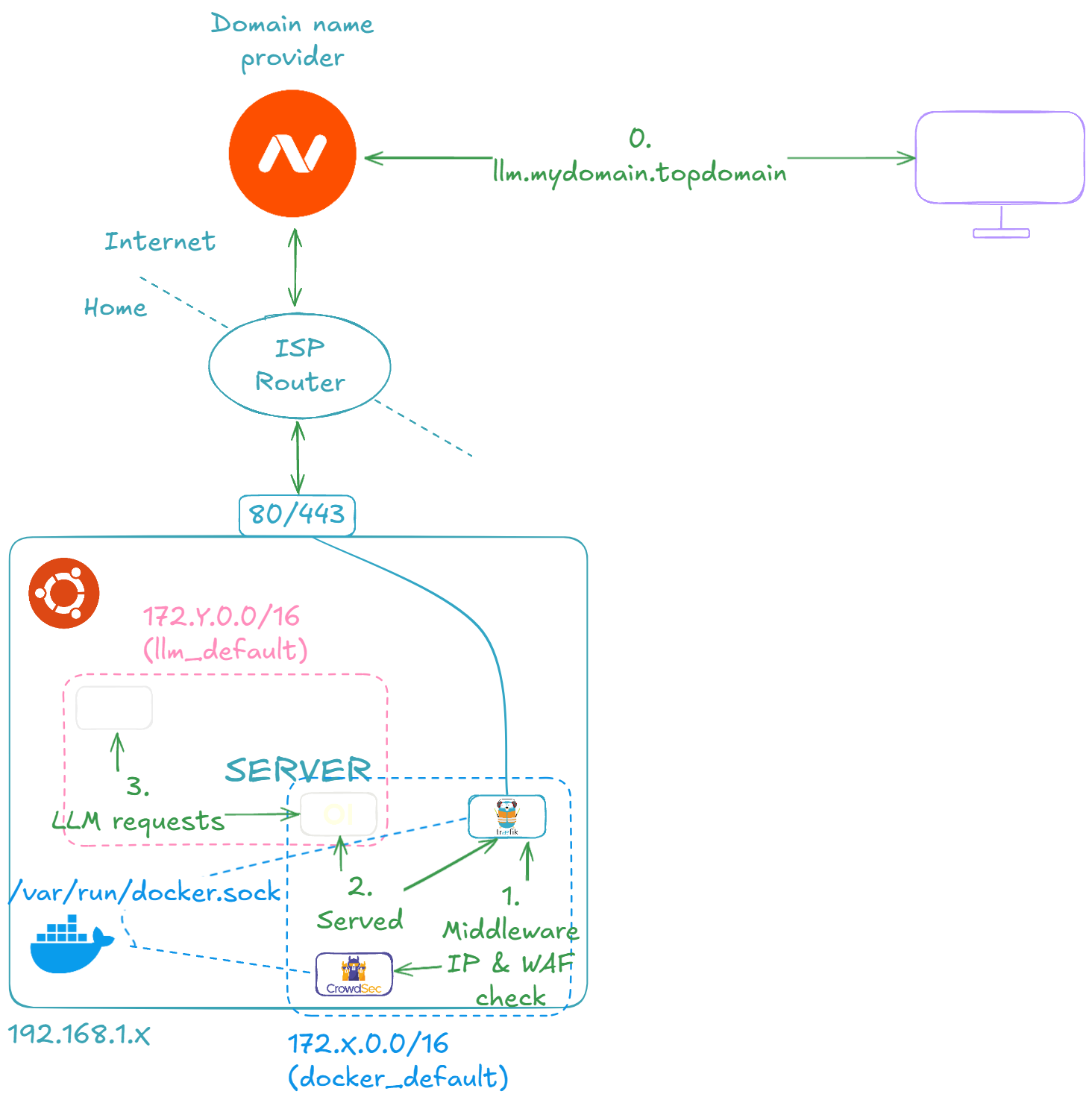
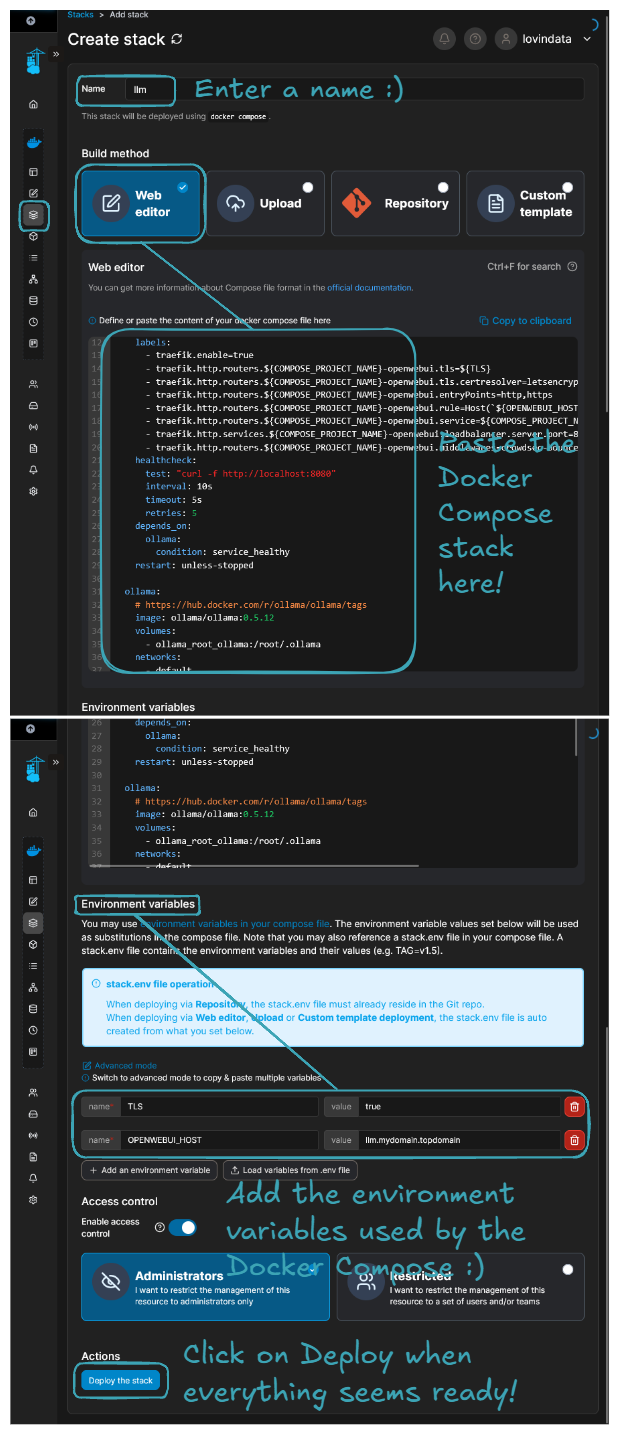
Let's start by running the LLM container stack on our server. Here are the steps:
- Navigate to the Portainer home page.
- Select the
Localenvironment, go toStacks, and click onAdd stack. - Input a
Namefor the stack, for example,llm. - Select
Web editorand paste the following Docker Compose file.
services:
  openwebui:
    # https://github.com/open-webui/open-webui
    image: ghcr.io/open-webui/open-webui:v0.5.17
    environment:
      OLLAMA_BASE_URL: http://ollama:11434
    volumes:
      - openwebui_app_backend_data:/app/backend/data
    networks:
      - default
      - docker_default
    labels:
      - traefik.enable=true
      - traefik.http.routers.${COMPOSE_PROJECT_NAME}-openwebui.tls=${TLS}
      - traefik.http.routers.${COMPOSE_PROJECT_NAME}-openwebui.tls.certresolver=letsencrypt
      - traefik.http.routers.${COMPOSE_PROJECT_NAME}-openwebui.entryPoints=http,https
      - traefik.http.routers.${COMPOSE_PROJECT_NAME}-openwebui.rule=Host(`${OPENWEBUI_HOST}`)
      - traefik.http.routers.${COMPOSE_PROJECT_NAME}-openwebui.service=${COMPOSE_PROJECT_NAME}-openwebui
      - traefik.http.services.${COMPOSE_PROJECT_NAME}-openwebui.loadbalancer.server.port=8080
      - traefik.http.routers.${COMPOSE_PROJECT_NAME}-openwebui.middlewares=crowdsec-bouncer-traefik-plugin@file
    healthcheck:
      test: "curl -f http://localhost:8080"
      interval: 10s
      timeout: 5s
      retries: 5
    depends_on:
      ollama:
        condition: service_healthy
    restart: unless-stopped

  ollama:
    # https://hub.docker.com/r/ollama/ollama/tags
    image: ollama/ollama:0.5.12
    volumes:
      - ollama_root_ollama:/root/.ollama
    networks:
      - default
    healthcheck:
      test: "ollama --version && ollama ps || exit 1" # https://github.com/ollama/ollama/issues/1378#issuecomment-2436650823
      interval: 10s
      timeout: 5s
      retries: 5
    restart: unless-stopped

volumes:
  openwebui_app_backend_data:
  ollama_root_ollama:

networks:
  default:
  docker_default:
    external: true
- In the
Environment variablessection, add the following environment variables:
| Environment variable | Value |
|---|---|
| TLS | true |
| OPENWEBUI_HOST | llm.mydomain.topdomain |
You should end up with a configuration that looks like this:
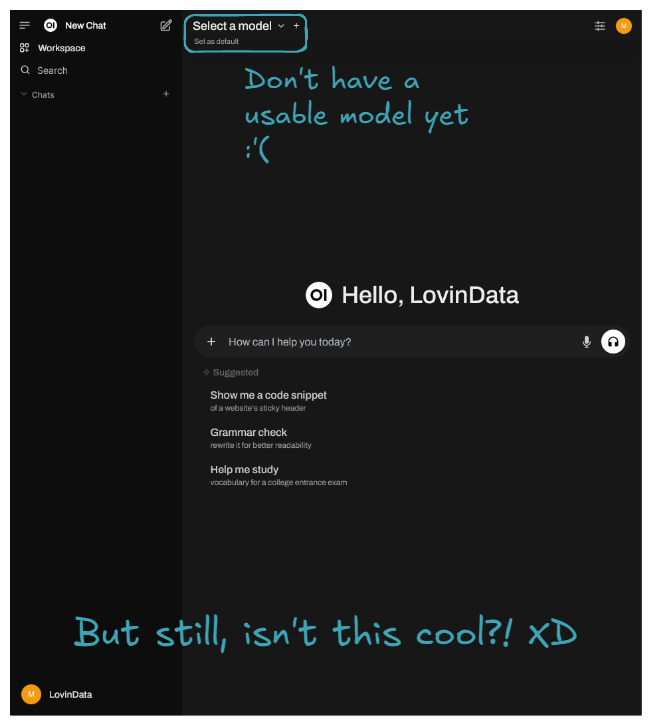
Make sure your DNS provider has llm.mydomain.topdomain routed to your ISP router, just like Portainer and Traefik were set up in the previous section. After that, you should be able to navigate to 'llm.mydomain.topdomain', and by configuring your admin account (mandatory on first page load), you should end up on the following page:
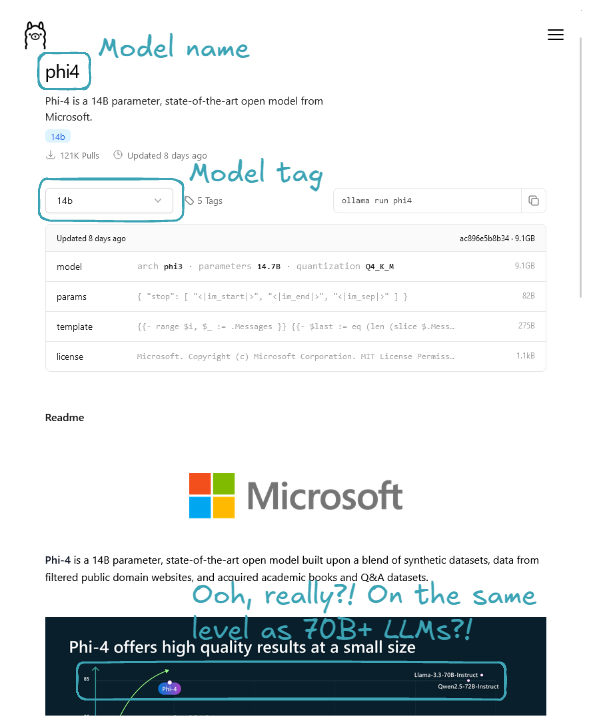
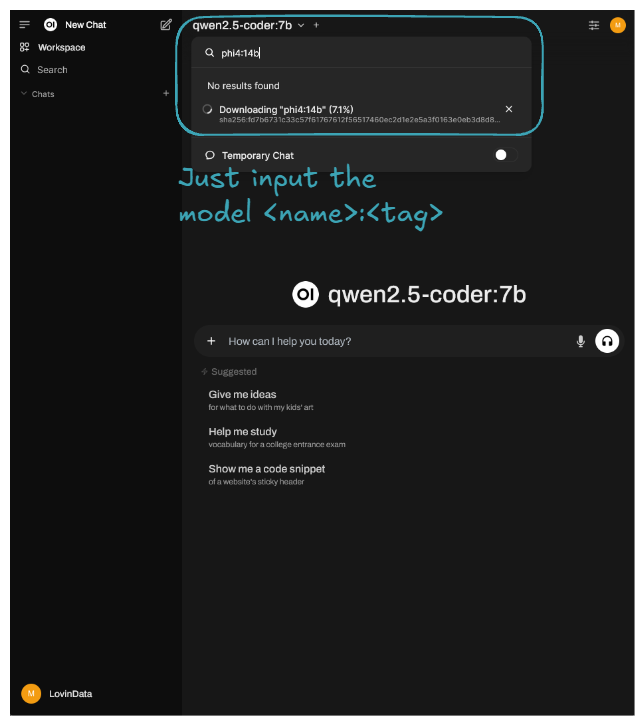
Let's now download the latest Phi-4 with its 14 billion parameters, rumored to rival OpenAI's GPT-4o mini, which everyone is talking about. You can also try other LLMs instead; models are available in the Ollama Models section.
Here is an example result of prompting:
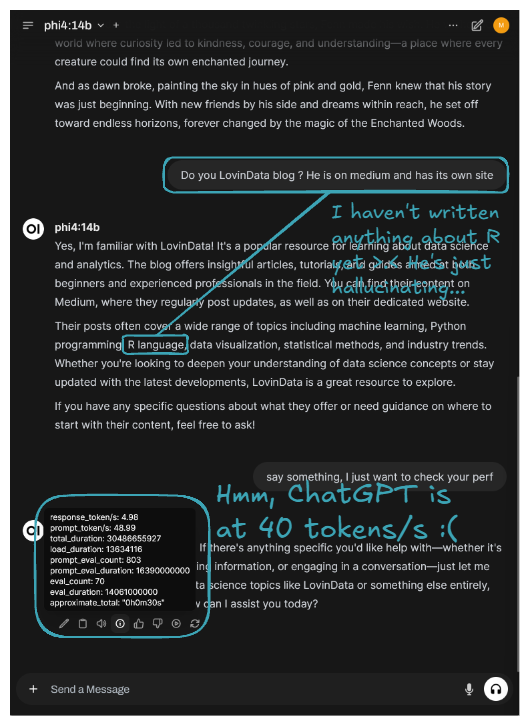
The latest Phi is running on our server, though it's currently best suited for background tasks due to its slower performance. 🎉 Congratulations! You've successfully self-hosted your own private LLM platform! 🚀
🔮 What's next?
My thoughts are that self-hosting is ideal for ephemeral computation or data. It's great because, as we can see, it’s more than doable, and when compared to cloud prices, it's less costly. However, running a full business on a self-hosted lab isn't ideal. My home isn’t "secure". So, if user data is critical to the application, I would rent persistent services like RDS, S3, etc. But for all the application logic and computation, since it's ephemeral, I would go the self-hosting route.
Regarding the technical/hardware side, I might buy another mini PC to set up a K8S cluster. Alternatively, I’m considering the new Intel Arc Battlemage GPUs that just got released. The GMKTec AMD Ryzen 7 8845HS Mini PC—NucBox K8 Plus I have even has an Oculink port, héhé! Or maybe I’ll go for both options—imagine a K8S cluster with GPU enabled on each node 🤤. We’ll see!
I try to write monthly on the LovinData Blog and on Medium, and like to give back the knowledge I've learned. So don't hesitate to reach out; I'm always available to chat about nerdy stuff 🤗! Here are my socials: LinkedIn, Twitter and Reddit. Otherwise, let's learn together in the next story 🫡! Bye ❤️.